
 Microsoft Fabric
Why Doesn't a Fabric Lakehouse Sync Data to Git?
A developer setting up Git integration in Microsoft Fabric expects a lakehouse to be versioned like code. The community discussion explains why that's deliberately not the case, and what does and doesn't end up in Git.
Discussion Summary
- Source
- Technology
- Microsoft Fabric
- Category
- DevOps & ALM
Question
Why doesn't a Fabric Lakehouse sync data to Git?
Recommendation
Store code in Git and data in OneLake. Understand which Fabric assets are versioned and which are not.
Key Points
- Why a developer expected a Fabric lakehouse to sync its data to Git, and why that didn't happen
- The underlying design: Git integration versions item metadata, not table data, and that is a deliberate choice
- Which providers and identity requirements actually apply, including a now outdated tenant requirement
- What is and isn't supported in Git, and what happens to unsupported items
- When Azure DevOps is the smoother choice over GitHub for Fabric CI/CD
The Challenge
A developer set up Git integration for a Fabric workspace expecting an experience similar to a regular software repo: commits, branches and history that capture the full body of work. That held true for most items, but a lakehouse caused confusion. The data in the tables did not appear to change after a Git operation, raising the question of whether this was a bug or a deliberate limitation.
Two practical questions also came up: did the Azure DevOps organization need to live in the same Microsoft Entra tenant as the Fabric tenant, and did GitHub actually work as well as Azure DevOps? Both questions turned out to be more relevant than expected, and the answer to the first one was already outdated relative to what many developers still assume.
Community Discussion
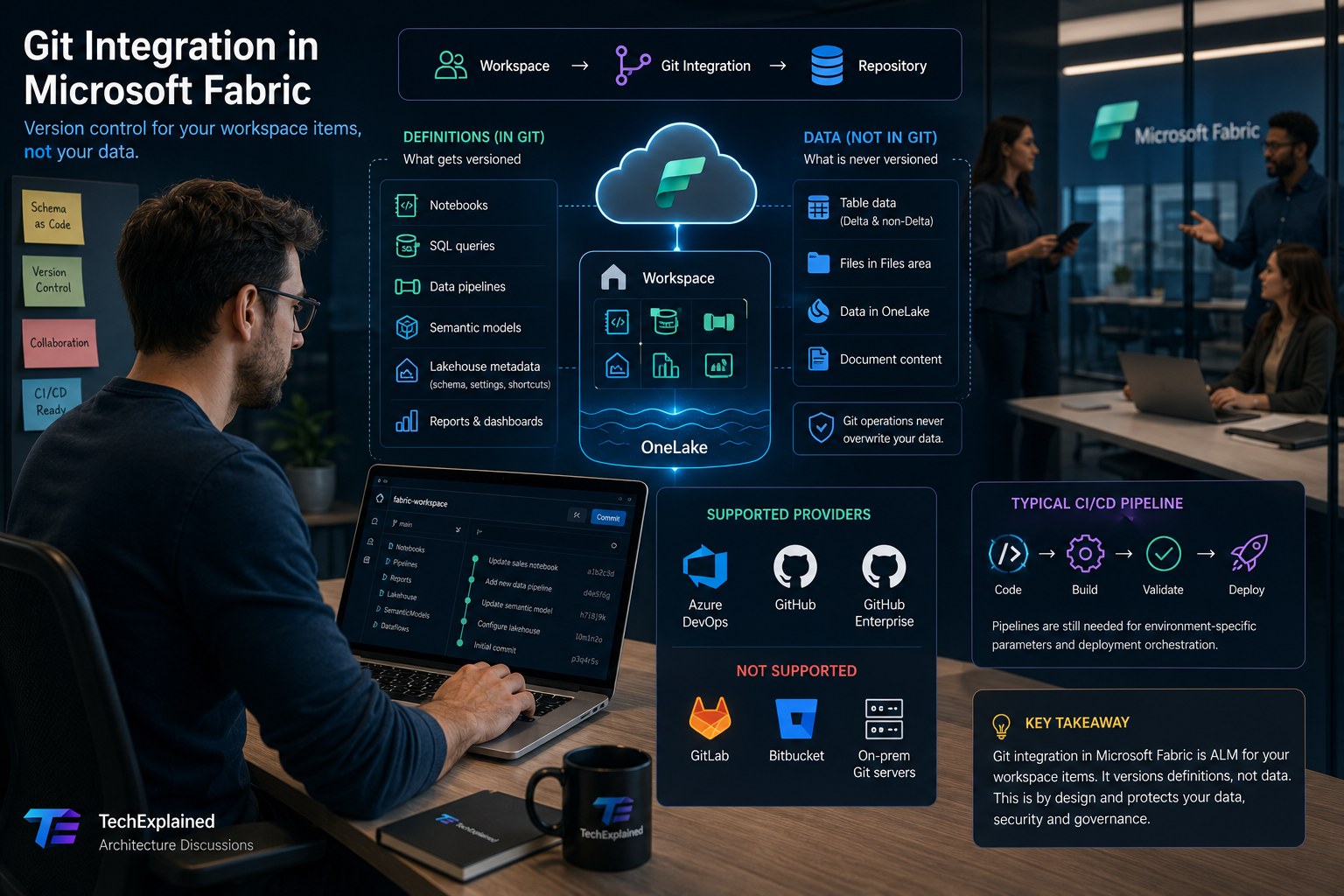
The responses to the original experience confirmed the pattern and shifted the conversation toward two deeper themes. The first was expectation management: Git integration in Fabric is Application Lifecycle Management at the workspace level, it versions definitions of items such as code, schema and metadata, not the underlying data. The surprise about the lakehouse turned out to be exactly where that distinction trips up many users.
The second theme was more principled: does data even belong in Git in the first place? The consensus in the discussion was nearly unanimous: no, with one nuanced exception for small reference or configuration tables. According to participants, those belong in the deployment process through pre- or post-deployment scripts, not as table content in the repository itself. An anecdote about credentials accidentally ending up in an ETL configuration table was cited as exactly the risk this approach avoids.
It was also confirmed that GitLab, Bitbucket and on-premises Git servers are not supported, which surprised some participants. Part of the discussion also covered branch permissions, which until recently sat exclusively with workspace admins, and whether Git integration makes deployment pipelines redundant. On that last point the community was clear: for environment-specific parameters, pipelines are still often needed alongside Git.
Microsoft Guidance
Microsoft Learn confirms that Git integration operates at the workspace level: the full workspace structure, including subfolders, is preserved in the Git repository, and commits, branches and history work the way developers expect from regular software projects. Supported providers are Azure DevOps (cloud only), GitHub and GitHub Enterprise, also cloud only. GitLab, Bitbucket and on-premises Git servers are not supported.
For a lakehouse specifically, only metadata is tracked: display name, description, logical GUID, SQL analytics endpoint metadata and OneLake shortcut metadata. This metadata is serialized to JSON. Tables, both Delta and non-Delta, and folders in the Files section are never tracked or versioned, and Git or deployment operations never overwrite data in these items. Which object types get tracked can be chosen per lakehouse; new lakehouses have all GA object types checked by default, preview object types are not.
To use Git integration, the right tenant switches need to be enabled in the Admin portal: "Users can synchronize workspace items with their Git repositories" and, for branching into a new workspace, "Create workspaces." A separate switch applies for GitHub. Depending on the organization's settings, these switches can be enabled by the tenant, capacity or workspace admin.
The requirement that causes the most confusion in practice is now outdated. Microsoft Learn no longer states that the Azure DevOps organization must live in the same Entra tenant as the Fabric tenant. The hard requirement is an active Azure DevOps account registered to the same Fabric user, even when that Azure DevOps organization lives in a different tenant. Only a workspace admin can initially connect a workspace to a repository; after that, anyone with the right permissions in that workspace can work in it.
Architecture Perspective
The distinction between definitions and data is not a limitation of Git integration, it is the core of the design. Fabric applies exactly the same approach that is standard in regular database CI/CD: schema and configuration belong in source control, data does not, with the only exception being small seed or lookup tables through an explicit deployment script. That not only prevents unintended data loss during a Git operation, it also prevents sensitive content, such as credentials in a configuration table, from accidentally ending up in a repository.
"Git integration versions definitions, not data. That is a deliberate design choice, not a bug."
The first synchronization deserves attention as an architectural decision in its own right. If the workspace or the Git branch is empty, content is copied from the non-empty side to the empty side. If both already contain content, an explicit choice has to be made about which side overwrites the other. Anyone starting from an existing, populated repository runs into a choice that simply doesn't arise with an empty repository. Starting from an empty repository and letting Fabric populate it is the most reliable route.
Not every Fabric item is supported in Git. Notebooks, Lakehouse, Spark Job Definitions, Environment, Dataflow Gen2, Pipeline, Warehouse, Report and Semantic model, Paginated report, Variable Library and Eventhouse or KQL items are among what is supported, though several Power BI items are still listed as preview. A classic Power BI dashboard is not among the supported items. The architecturally relevant point isn't the list itself, but the behavior for unsupported items: a workspace or Git directory containing unsupported items can still be connected, but those items are ignored. They are not saved, not synced and not deleted, but they do appear visibly in the source control pane without being able to be committed or updated. That silent behavior is a bigger operational risk than a hard error would be, precisely because it is easy to overlook.
The permission model around branches has recently been relaxed. By default, Switch branch and Checkout to new branch require the Admin role, but a workspace admin can enable the setting "Allow users with at least Contributor role to change Git branch." After that, Contributors and Members with write access on all artifacts can also branch themselves, under their own identity. Initially connecting or disconnecting a workspace from a repository always remains admin only.
Git integration does not replace deployment pipelines. Environment-specific parameters, such as semantic model settings or lakehouse IDs within a Dataflow Gen2, still need to be managed per environment after a Git sync. The recommended route for this is the Variable Library, which remaps sources and destinations per stage without having to hard-code this in the code itself.
Between Azure DevOps and GitHub, the real difference lies in authentication and operational convenience, not functionality. Azure DevOps supports authentication through OAuth2 or a Service Principal; the latter makes it easier to set up unattended CI/CD pipelines, provided the Service Principal is properly licensed and has the right access. GitHub works with a classic or fine-grained personal access token; the repository URL is optional for github.com but required for GitHub Enterprise. In practice, PAT management requires more ongoing maintenance than the Service Principal route on Azure DevOps. For organizations where data residency matters, the region in which a GitHub organization was created is relevant for metadata sovereignty.
Key Takeaways
Metadata, not data:
Git integration versions item definitions; table data in a lakehouse always stays out of Git, by design.
Reference data belongs in scripts, not the repo:
small seed or lookup tables belong in pre- or post-deployment scripts, not as table content in Git.
The tenant requirement is outdated:
what's required is the same Fabric user, not the same Entra tenant; cross-tenant Azure DevOps works.
Unsupported items fail silently:
they stay visible in the source control pane but can't be committed or updated.
Start from an empty repository:
that avoids the choice of which side, workspace or branch, has to overwrite the other on first sync.
TechExplained Recommendation
Recommended when
- Teams need commit, branch and history workflows at the workspace level
- CI/CD through Azure DevOps with Service Principals is wanted for unattended deployments
- Schema and configuration changes need to be traceable, separately from the underlying data
- Multiple environments are managed through Variable Library and deployment pipelines
Not recommended when
- The goal is data version control or a backup of the table data itself
- Only classic Power BI dashboards are used without other Fabric items
- No Azure DevOps or GitHub account can be linked to the same Fabric user
Related Content
Related Use Cases
Related Architecture Assessments
Related How-tos