
TechExplainedTechExplained
|
Best PracticeLevel: Intermediate

Databricks compute and cost best practices

Where the bill on Databricks comes from: job versus all-purpose compute, autoscaling, automatic termination, Photon and DBCU prepurchase.

TechExplained 3 min readPublished: 10 August 2026Last updated: 10 August 2026
#cost management#compute#dbu#finops#databricks
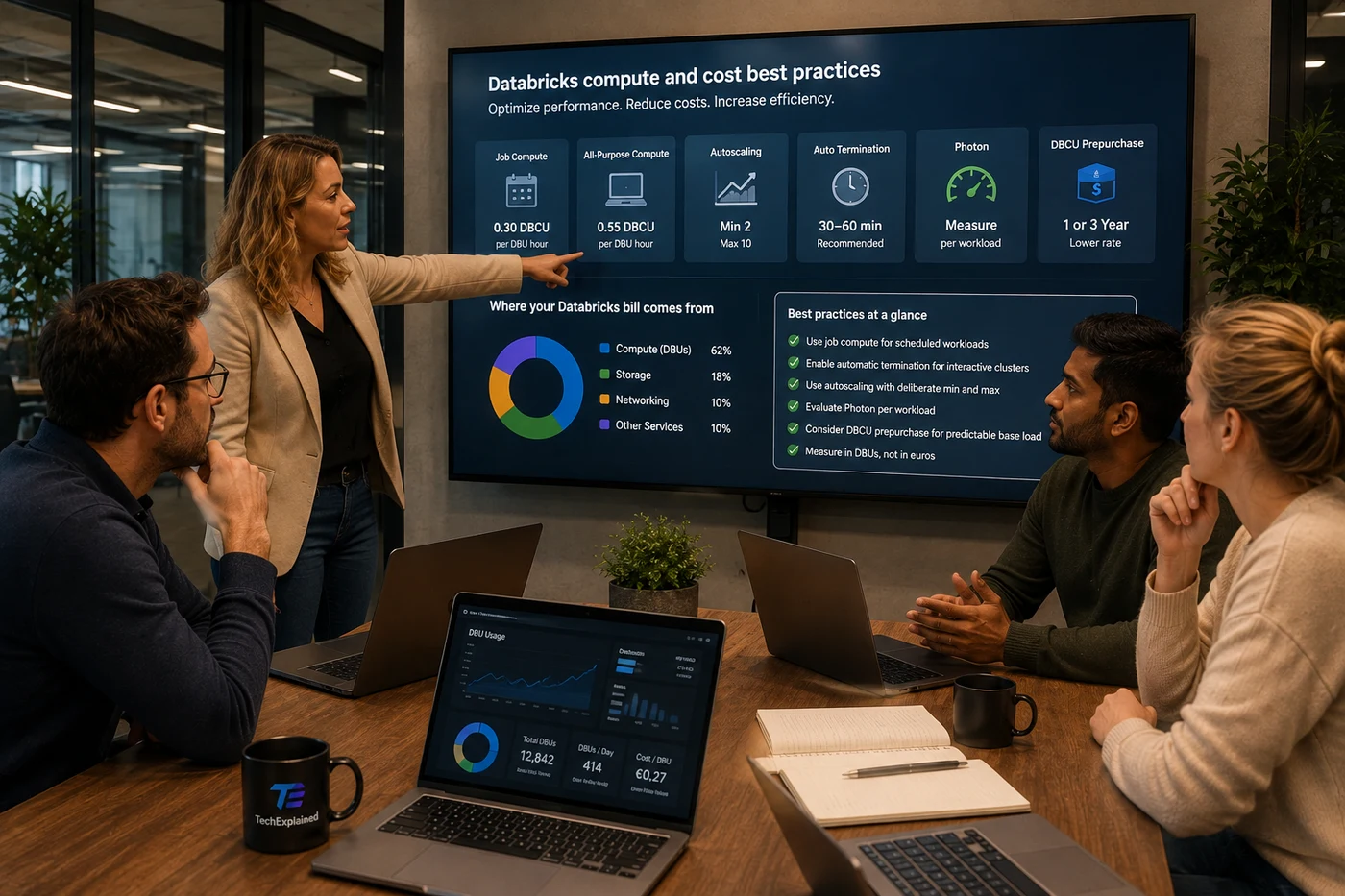
Architect presenting Databricks compute and cost best practices to the team, with job versus all-purpose compute, autoscaling, Photon and the split of the bill on screen
01

Use job compute for everything that runs on a schedule

This is the biggest dial and also the easiest one. All-purpose compute on the Premium tier consumes 0.55 DBCU per DBU hour, job compute on that same tier 0.30. So the same workload on job compute is roughly 45 percent cheaper, without changing a line of your code.

The reason this still goes wrong is convenience: you develop in a notebook on an all-purpose cluster and then set that cluster as the target on your job. Make it a hard rule that scheduled work runs on job compute and that all-purpose is for interactive work only.

02

Turn automatic termination on for everything interactive

Interactive compute that keeps running is the most common line on an unexplainable Databricks bill. Turn automatic termination on, with thirty to sixty minutes for development environments. Shorter than that annoys people and produces startup time you pay back in waiting.

Also know that Databricks permanently deletes terminated compute after thirty days. If you want to keep a configuration, pin it, otherwise it is gone and somebody rebuilds it with different settings.

03

Turn autoscaling on with a deliberate lower bound

Autoscaling with a minimum and a maximum number of nodes prevents both the cluster that is too small for the peak and the cluster that sits at peak size all day. Choose the lower bound based on what the workload actually needs rather than on one, because scaling down too far costs you startup time on every subsequent task.

The exception is structured streaming. Autoscaling does scale up there but scales down poorly. For streaming, use Lakeflow pipelines with enhanced autoscaling, which scales both horizontally and vertically and is designed for this type of workload.

04

Treat Photon as a trade-off, not a default

Photon speeds up queries, and speeding up usually means less compute time. But Photon also increases the number of DBUs a cluster consumes. Whether it is cheaper on balance therefore depends on how much faster your workload actually gets.

Measure it per workload before you turn it on tenant-wide. On heavy SQL and Delta operations Photon often pays for itself, on light or I/O-bound tasks it does not.

05

Consider DBCU prepurchase for your base load

If you have a predictable share that runs every month, you can buy DBCUs up front for one or three years at a lower rate. Watch what that does and does not cover: the prepurchase applies to the DBU cost, not to the underlying compute, storage and networking. Those stay on pay-as-you-go.

So only prepurchase your demonstrable base load, not your peak. Buying at the peak means paying for capacity that sits idle most of the year.

06

Measure in DBUs, not in euros

The bill is a consequence, the DBU is the cause. If you steer on the monthly bill you are steering on a number that only exists afterwards and that is noisy with rates, reservations and exchange rates. Steer on DBUs per workload and per team, and you see behaviour instead of outcome.

See also Lakehouse on Azure Databricks for where these choices land in the architecture.

The process at a glance

Click a step for its key decision

Summary

Use job compute for everything that runs on a schedule

This is the biggest dial and also the easiest one. All-purpose compute on the Premium tier consumes 0.55 DBCU per DBU hour, job compute on that same tier 0.30. So the same workload on job compute is roughly 45 percent cheaper, without changing a line of your code.

Production Readiness Checklist

Before you go live, verify these production recommendations.

  • Job compute used for everything that runs on a schedule
  • Automatic termination on for all interactive compute
  • Autoscaling with a deliberate min and max per workload
  • Photon weighed per workload, not on by default
  • Streaming on Lakeflow pipelines with enhanced autoscaling
  • DBCU prepurchase considered for the predictable base load
  • Compute worth keeping pinned (gone after 30 days otherwise)
Databricks compute and cost best practices | TechExplained