
|
Best PracticeLevel: Advanced

Lakehouse best practices

What makes the difference in production Lakehouses: Delta maintenance, V-Order, schema discipline and the line between Silver and Gold.

TechExplained 2 min readPublished: 5 June 2026Last updated: 5 June 2026
#lakehouse#delta#performance
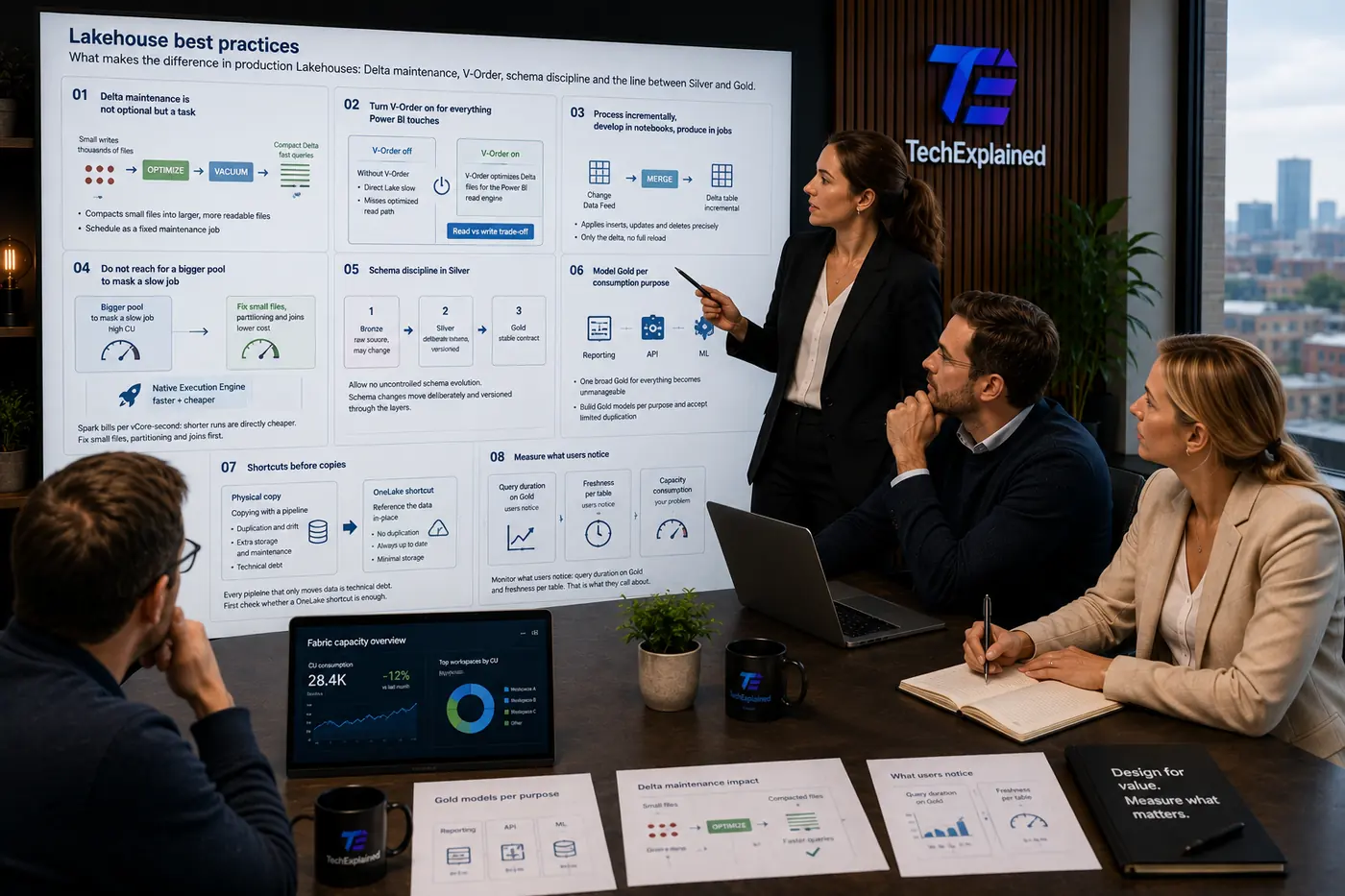
Architect presents Lakehouse best practices to the team, with Delta maintenance, V-Order and Gold models on the screen
01

Delta maintenance is not optional but a task

Schedule OPTIMIZE and VACUUM as standing maintenance jobs. Thousands of small files are the most common cause of slow queries, and they arise on their own with frequent small writes. Whoever writes streaming or micro-batches without compaction builds a slow Lakehouse guaranteed.

Small writes

Streaming and micro-batches produce many small files, the most common cause of slow queries.

Schedule as a fixed maintenance job

Thousands of small files appear on their own with frequent writes. Compaction turns it back into a fast Lakehouse.

02

Turn V-Order on for everything Power BI touches

In newly created workspaces, V-Order is off by default for Spark and Lakehouse; Warehouse keeps it on. Direct Lake works fine without it, so treat it as an accelerator rather than a prerequisite: it makes a noticeable difference mainly on a cold cache. Turn it on for Gold and for everything Power BI reads, and do not turn it off "temporarily for faster writes", that temporariness becomes permanent and the reports get slow. V-Order is a read-versus-write trade-off though, not a free knob: on heavy, write-intensive intermediate tables that feed no reporting, you may deliberately leave it off.

Without V-OrderDirect Lake slow
  • Direct Lake misses its optimized read path
  • Reports become noticeably slower
  • "Temporarily off for faster writes" becomes permanent

V-Order off / V-Order on

V-Order optimizes Delta files for the Power BI read engine. A read-versus-write trade-off.

03

Process incrementally, develop in notebooks, produce in jobs

The biggest silent capacity drain is a full reload of Silver every night. Use MERGE with the Change Data Feed so you only process the delta. And treat transformation as tested, reusable code: develop in notebooks, but productionize in Spark Job Definitions or pipelines, a notebook with hidden cell state is not a production artifact. Put shared logic in a tested library instead of copied notebooks; ten copies are ten places to patch.

Change Data Feed

Delivers exactly the changed rows since the previous run.

Only the delta, no full reload

Process only the delta instead of a nightly full reload of Silver.

04

Do not reach for a bigger pool to mask a slow job

Spark bills per vCore-second, so shorter runs are directly cheaper. First fix small files, partitioning and joins before you scale up. Set a short session timeout (a session that keeps running while nobody works is the biggest silent cost), use high concurrency to share sessions, and consider the Native Execution Engine: one of the few knobs that is both faster and cheaper. Do verify on your real workload that the heavy operators actually run native, the fallback to standard Spark is silent.

Spark bills per vCore-second: shorter runs are directly cheaper. Fix small files, partitioning and joins first.

05

Schema discipline in Silver

Do not allow uncontrolled schema evolution in Silver and Gold. Sources may change; your Silver schema changes through a deliberate change with versioning, not through mergeSchema surprises on a Friday afternoon.

Allow no uncontrolled schema evolution. Schema changes move deliberately and versioned through the layers.

06

Model Gold per consumption purpose

One wide "Gold for everything" becomes unmanageable. Make Gold models per use case (reporting, ML features, API) and accept limited duplication, you trade cheap storage for expensive confusion if you do it the other way around.

Gold per purpose

Reporting

Model aimed at Power BI: star schema, V-Order, Direct Lake friendly.

One broad Gold for everything becomes unmanageable. Build Gold models per purpose and accept limited duplication.

07

Shortcuts before copies

Every pipeline that only moves data is technical debt. First check whether a OneLake shortcut suffices; copy only when you need transformation, isolation or retention the source does not provide.

Copying with a pipelineduplication and drift
  • A second copy that can go stale (drift)
  • Extra storage and maintenance
  • A move-only pipeline is technical debt

Physical copy / OneLake shortcut

Every pipeline that only moves data is technical debt. First check whether a OneLake shortcut is enough.

08

Measure what users notice

Monitor query duration on Gold and freshness per table, those are the two metrics users call about. Capacity consumption is your problem; these two are their problem, and therefore your first dashboards.

Monitor what users notice: query duration on Gold and freshness per table. That is what they call about.

The process at a glance

Click a step for its key decision

Summary

Delta maintenance is not optional but a task

Schedule OPTIMIZE and VACUUM as standing maintenance jobs. Thousands of small files are the most common cause of slow queries, and they arise on their own with frequent small writes. Whoever writes streaming or micro-batches without compaction builds a slow Lakehouse guaranteed.

Production Readiness Checklist

Before you go live, verify these production recommendations.

  • V-Order explicitly enabled on Gold (off by default)
  • OPTIMIZE scheduled as a maintenance job
  • VACUUM configured
  • MERGE with Change Data Feed used
  • Schema governance set up in Silver
  • Shortcuts considered before copies
Lakehouse best practices | TechExplained