
 Microsoft Fabric
Is Plan in Fabric IQ Too Expensive for SMB Customers?
A community discussion about the pricing model of Plan in Fabric IQ exposes a deeper tension: an enterprise planning platform with session-based billing, tested against the expectations of an SMB user.
Discussion Summary
- Source
- Technology
- Microsoft Fabric
- Category
- Cost Management
Question
Is Plan in Fabric IQ too expensive for SMB customers?
Recommendation
Treat it as a solution-fit question, not a pricing question: only recommend it once Fabric capacity is already running and planning is genuinely cross-functional.
Key Points
- Why the community finds Plan's session model expensive and unpredictable
- Microsoft's reasoning: planning is cyclical, so a hybrid role and session model fits better than pure consumption
- The architectural consequence: workspace permissions, not planning roles, are the real governance lever
- A concrete CU consumption example and the practical cost floor toward F4
- When Plan is, and isn't, a good fit for an SMB customer
The Challenge
Since its preview, Plan in Fabric IQ has added an Enterprise and Corporate Performance Management (EPM & CPM) layer to Fabric, letting financial and operational planning run alongside the rest of the data platform. In a discussion in the Microsoft community, an SMB user asked the question many smaller organizations ask themselves: is this affordable for a team that only wants to update a forecast every once in a while?
At first glance the question looks like a pricing question, but the real tension runs deeper. Plan is deliberately built as an enterprise planning platform, not a lightweight forecasting tool, and the pricing model reflects that choice. The SMB user in the discussion expected pay-per-second consumption like other Fabric workloads, but instead encountered a session model where a single action opens a 30 day cost commitment. That is not a bug, it is a design choice, but it clashes with the expectation of "occasionally updating a forecast."
Community Discussion
The discussion centered on three recurring points. First, why does a single action already start a full month of billing, even if nothing happens for weeks afterward? Participants compared this to other Fabric workloads, where consumption is billed more precisely per second, and found the session model felt unpredictable by comparison.
Second, there was confusion about the role structure. Most contributions to the discussion only mentioned Viewer and Planner, with Planner framed as the expensive option for anyone who wanted to do more than just read. As the discussion progressed, one participant pointed out a crucial middle tier, the Stakeholder role, which enables data entry and writeback at a fraction of Planner's cost. That correction changed the conversation: the question was no longer "is Planner too expensive" but "who actually needs Planner."
Third, opinions split along a clear line. Participants who mainly wanted occasional, standalone planning found the model expensive and unpredictable. Participants who were already running on Fabric capacity and doing cross-functional planning (finance, operations and leadership together) saw the session model as an advantage, since peaks around month-end and quarter-end get smoothed out and quiet months stay free.
Microsoft Guidance
Microsoft explains the design choice itself: planning is cyclical, with peaks around month, quarter and year close and relatively little activity in between. Pure consumption pricing would undervalue that work pattern, and seat licenses are too rigid for people who only participate occasionally. Hence the hybrid model.
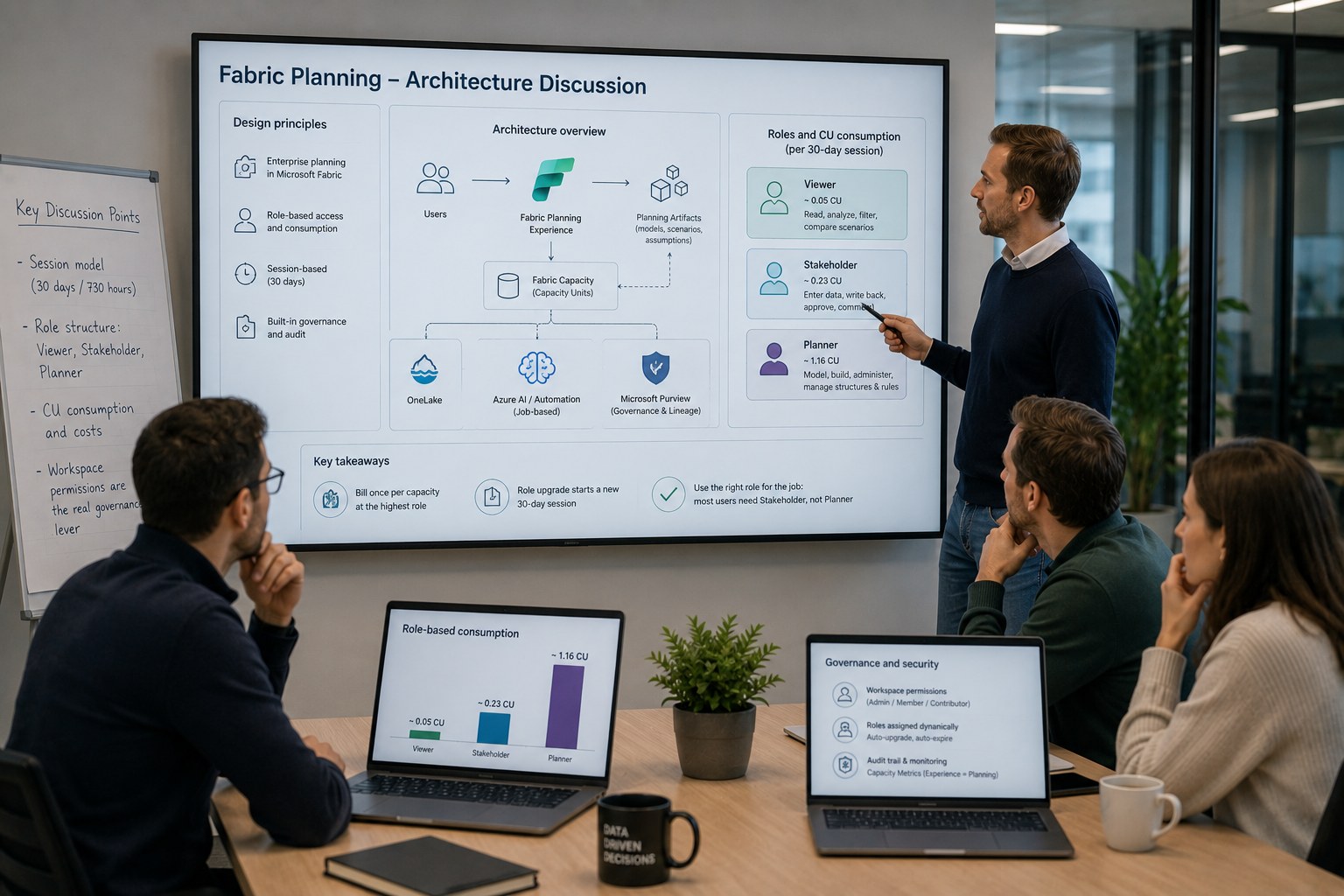
Plan consumes existing Fabric Capacity Units, not a separate license or subscription, through three components. Role-based consumption means each role consumes a different amount of CUs. Session-based consumption ties together user, role, capacity and time window: a session starts once someone works "meaningfully" with a planning artifact and then runs for 30 days (referred to by Microsoft as 730 hours, a full month), and closing early does not lower the cost. Job-based consumption, such as automation for data sync or updates to linked sheets, is billed separately at a fixed price per successful job.
Plan is now generally available worldwide as part of the Microsoft Fabric SKU and its billing meters are active. The Fabric Capacity Metrics app, filtered on Experience = Planning, shows the consumption; costs now genuinely run alongside it.
Microsoft's documentation describes three roles. Viewer can only read, analyze, filter and compare scenarios. Stakeholder can enter data, write back, create and approve scenarios, and comment. Planner can model, build structures and rules, and administer. Roles are assigned dynamically: everyone starts as Viewer and is automatically upgraded once an action requires more rights, entering data leads to Stakeholder, modeling leads to Planner. Downgrading is not possible, a role automatically expires after 30 days, and on the next interaction the first successful action determines the new role. Roles are evaluated per capacity, not shared across capacities.
The Microsoft employees in the discussion emphasized a point that is often missed: the real governance lever is not the planning roles themselves, but the Fabric workspace permissions. Only someone with Admin, Member or Contributor on the workspace can perform Planner actions, so workspace permissions determine who can become a Planner, and therefore expensive, in the first place.
Architecture Perspective
The concrete CU weights that distinguish the roles, roughly 0.05 for Viewer, 0.23 for Stakeholder and 1.16 for Planner (sustained consumption over a 30 day session), appear in Microsoft's billing documentation as a figure, not as text. The exact numbers come from a community source that bases them on Microsoft's billing post and on confirmation from the Plan (Fabric IQ) product team. Treat them as well-founded estimates, therefore, not as an official price sheet.
Two consequences are architecturally relevant. A user is billed only once within a capacity, at their highest role. And a role upgrade opens a new 30 day session at the higher level, a fully new commitment. The core optimization follows naturally: bulk data entry belongs at the Stakeholder level, roughly a fifth of a Planner, and only whoever actually builds the model needs Planner. Giving everyone Planner costs roughly five times too much.
A concrete example makes "what does this actually cost" tangible. Take a small team of 1 Planner, 3 Stakeholders and 5 Viewers: 1 times 1.16 plus 3 times 0.23 plus 5 times 0.05 comes to 2.10 CU. With a 30 percent buffer that becomes roughly 2.73 CU, which fits an F4 capacity (4 CU). At the time of writing, F4 pay-as-you-go came to roughly $525.60 per month and a 1 year reservation to roughly $312.67 per month. Treat those figures as indicative: the Azure pricing page renders rates dynamically and they differ by region and date. Check them at https://azure.microsoft.com/pricing/details/microsoft-fabric/.
The SMB pain point fits in one sentence: a single Planner alone already costs 1.16 CU, roughly 58 percent of an F2 capacity (2 CU). An F2 therefore cannot carry a real deployment, the practical floor is F4. For an organization that only wants to update a forecast occasionally, that is a real fixed cost floor, while Excel costs nothing.
Two mitigating facts belong in a fair answer. Without activity there is no session and therefore no cost, quiet months are free. And unused CUs are shareable with other Fabric workloads such as notebooks, pipelines and Power BI, so for an organization already running Fabric capacity the marginal cost is lower. Overage works in two directions: with overage on, extra consumption is billed at three times the PAYG rate, with overage off, the capacity gets throttled.
So is Plan ready for SMB? Short answer: for most SMB forecasting scenarios, not yet, unless Fabric capacity is already running. It is a good fit when an organization is already on Fabric capacity, does real cross-functional planning with finance, operations and leadership together, and needs governance, writeback and plan versus actuals in one environment. In that case the session model actually works in its favor: peaks get smoothed out and quiet months are free. It is not yet a good fit for a handful of users with a monthly forecast: the 30 day session commitment, the roughly 1.16 CU Planner floor and the practical F4 floor of roughly $525 per month pay-as-you-go, or $313 reserved, make it expensive compared to Excel, Power Apps or a lightweight Fabric App. The functionality only justifies the cost once there is enough planning complexity.
"This is not a pricing discussion. It is an architecture fit discussion."
That ultimately makes this a solution fit question, not a pricing question. Run both a technical and a financial check before every recommendation, and lock down Planner roles firmly through workspace permissions rather than relying on the planning roles themselves.
Key Takeaways
Governance first:
workspace permissions, not planning roles, determine who can become a Planner
Optimize by role, not by user:
bulk data entry belongs at Stakeholder level, not Planner
Validate technical and financial fit:
run both checks before recommending Plan to a customer
Know the practical cost floor:
a single Planner alone already pushes an organization toward F4
Treat community figures as estimates:
CU weights are well-founded, but not an official price sheet
TechExplained Recommendation
Recommended when
- Fabric Capacity is already running within the organization
- Enterprise planning spans multiple departments
- Cross-functional planning is needed between finance, operations and leadership
- Governance, writeback and plan-versus-actuals are required in one environment
Not recommended when
- It concerns occasional Excel forecasting for a small team
- Only a single Planner is needed without a broader role structure
- No investment in Fabric capacity has been made yet
Related Content
Related Use Cases
Related Architecture Assessments
Related How-tos